Unofficial archive. This is a read-only, community-run archive of the Apple Support Community. It is not affiliated with or endorsed by Apple Inc.

iPhone ear speaker not working after update

The earpiece speaker on my IPhone 13 Pro stopped working after I recently updated my phone to the new IOS 16.0.02. There have been not settings changes, no physical damage and YES, I’ve already tried every single ‘fixing sound issues’ article on Apple Support along with YouTube. None of those things worked.


I noticed several other forums and commenters who faced the same problem.


Has anyone found a solution to this yet? Apple seems to be ignoring or avoiding the issue entirely


[Re-Titled by Moderator]

32 replies

I had the same problem but I figured out a workaround that consists of a few steps:

  • Play a voice message and get the phone close to your ear
  • Take it away again and now the message will be paused
  • Open the control center and keep sliding the volume slider up with your finger while you get the phone close to your ear again (which will resume the paused message, at least on telegram)
  • Now you should be able to hear it from the ear speaker

Happened to my moms phone twice with 17.4.1 update. Although I wouldn’t call it a “fix” the issue was resolved each time by going to Settings<Accessibility and sliding volume back and forth. Then power down and when we turned phone back on the ear piece worked just fine.

Found the fix for the Iphone 13: Connect to a bluetooth speaker or headset, turn ON Airplane mode for about 5 minutes. Turn it off. Play a voicemail or make a call and switch from the bluetooth device to iPhone. You will hear on the iphone again.

When we have done all these things, spoken with apple support, and gone to an in-person apple care specialist (someone I was sent to by apple support)...then what? The in-person specialist told me there was nothing he could do until Apple provides a "bug fix" for the issue. I'm on ios 16.1, but nothing has changed.

FIX!


https://youtu.be/SAcqdtFQJm8?si=pDpg8ogD2zIWJmAA


cleaning out the microphones, specifically the ones at the bottom of the phone worked for my iPhone 11 with newly updated 17.4.1 iOS version. Didn’t even think to clean the microphone until stumbling upon this YouTube video.

[Software update is not the fix] Possibility that the update has caused a hardware failure which mean no update would fix it.


Here is why this conclusion: Like the rest, my ear speaker stopped working after updating to 17.4.1 and enabling the hearing aid got me some very low sound out of the ear speaker. Now to the real test: I tried a method of downgrading the iOS to 17.3.1 which was stable for me with no problems with the speaker. And you guessed it already, nothing worked, speaker issue still there.

Okay I think I found the solution.

settings > sound and haptics > Spatial Audio

and then reset it.

I already face this issue then iam go to apple service store they said this is hardware issue. In some iPhone 15 series this issue occur. I will submit my mobile yesterday wait for replacement


NOTE : this issue occur in ear speaker so they replace the ear speaker part only not replace a mobile. only defective part replacement. iam fully dissopointed by this cause. with in one month period of time my mobile get this issue. Why apple do this type of mistakes? this issue decreases the apple brand value.

I’ve had this problem twice now and it happens randomly. I was curious if I would hear anything if turning on the hearing aid compatibility and it was very low volume. I tried restarting my phone and made s 00004000 ure it was up to date and it was. What’s fixed it both times for me is squeezing hard around the earpiece I’m not sure what it is. I don’t know if it’s a loose connection inside the phone but it’s worked twice for me now.

FIX!!!!! I’ve had this problem twice now and it happens randomly. I was curious if I would hear anything if turning on the hearing aid compatibility and it was very low volume. I tried restarting my phone and made sure it was up to date and it was. What’s fixed it both times for me is squeezing hard around the earpiece I’m not sure what it is. I don’t know if it’s a loose connection inside the phone but it’s worked twice for me now. Hope that helps some people. I think it being after an update is just a coincidence and for people saying it randomly started working again probably bumped their phone or something just right and made the connection again.

Update the software, they fixed it.

Okay I think I found the solution.

settings > sound and haptics > Spatial Audio

and then reset it.

(***I can't adjust the volume of an earpiece speaker during calls, also while listening voice messages on WhatsApp etc. It is only about the earpiece speaker, not the main speaker and sounds. I contacted Apple support and tried factory reset and diagnostics, but it doesn't work. How can iPhone users have this issue, my phone is very new. Even with cheap android I never had such issues. But the most expensive phone has it. It is just super annoying.)***


I also tested this with other phones which run on IOS 16 and had the same issue there. But phones with older IOS don't have this issue. I'm not sure if it is an issue, maybe Apple developers thought that it is a useless feature and they disabled it for Whatsapp, Telegram etc. But I use it every day basically. I receive dozens of voice messages on Whatsapp, and everyone has a different tone I don't carry earphones all the time, I just listen to them through the earpiece speaker and there is an absolute need to be able to adjust that volume. Maybe this is a strategy to force people to buy earphones. In this case, it would be a morally very cheap strategy. That is the very basic function of the phone and with IOS 16 we lost it. I hope it is just a bug and it will be fixed very soon.

I have an iPhone 14 and had same problem.


What fixed it for me was going to Accessibility, Touch, and Call Audio Routing and selecting Bluetooth. Can now hear calls on my headset.


Found solution on a YouTube video that help 00004000 ed. Can’t remember the guy’s name.

Try playing your music, while playing place on pause. Them turn phone completely off for 30 seconds then turn back on.


Hello Tiffee143,


We see that you're having and issue with the speaker on your iPhone. We also understand that you've done quite a bit of troubleshooting to help to resolve 00004000 this issue. Just to make sure we've checked everything, we'd like to have you go through the steps in the resource below that can help with this issue you're experiencing:


  1. "If your device has a Ring/Silent switch, move the switch forward—toward the device's display—so that orange isn't showing. If you're using an iPad, you can also swipe down from the top-right corner to open Control Center and make sure that Silent Mode is off. 
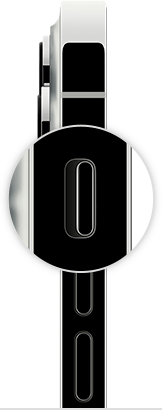
  2. iPhone ring/silent switch
  3. Open Settings > Focus > Do Not Disturb and make sure that Do Not Disturb is off.

Contact Apple Support

If you checked the sound settings and your device still has sound issues, contact Apple Support to discuss service options.


If you want to try more steps on your own

If you prefer, here are some more steps you can try on your own. After following these steps, you might still need to contact Apple Support to discuss service options.

  1. Remove all screen protectors, films, or cases from your device. 
  2. Check the speaker opening to see if it's blocked or dirty. On iPhone only, make sure that the receiver isn't blocked or dirty. 
  3. If necessary, clean the speaker or receiver opening with a small, soft-bristled brush. Make sure that the brush is clean and dry.
  4. Go to Settings > Sounds (or Settings > Sounds & Haptics), and drag the Ringer and Alerts slider back and forth a few times. If you don't hear any sound, or if your speaker button on the Ringer and Alerts slider is dimmed, your speaker might need service.
  5. If you hear sound, try making a call with your iPhone and turn on speakerphone. On iPad or iPod touch, make a FaceTime call. If you still can't hear, or hear static or crackling, then your network or reception could be the issue. Try to call again later, or from a different location."


If you hear no sound or distorted sound from your iPhone, iPad, or iPod touch speaker - Apple Support


If the issue persists, you'll want to reach out to Apple Support for further assistance with this issue.


Get Support


Thanks for using Apple Support Communities.


It still happens on IOS 16.2. But I found that the problem is with "black screen mode". When you put it close to your ear, the screen goes black and the sound button is disabled.

I have a similar issue. I have an iPhone 12 Pro and since 16.1.1 I have been unable to listen to any kind of audio message on ear. Yes, I’ve tried to raise the volume during the voice message but the buttons don’t work at all but they are completely fine during voice calls. I have also tried to force restart the iphone but of course it did not work at all. Also, I’ve tried to update to iOS 16.1.2 but it did not fix the issue at all. I am wondering what to do next, because I’ve tried to contact Apple Support by phone but the operator unfortunately could not do much apart from suggesting to reset all settings. I am quite frustrated so I’d appreciate if anybody could share some opinions or suggestions!

I can't adjust the volume of an earpiece speaker during calls, also while listening voice messages on WhatsApp etc. It is only about the earpiece speaker, not the main speaker and sounds. I contacted Apple support and tried factory reset and diagnostics, but it doesn't work. How can iPhone users have this issue, my phone is very new. Even with cheap android I never had such issues. But the most expensive phone has it. It is just super annoying.

Just a brief update to all those that posted comments about the same issue I had: the muted audio in voice messages while player on ear fixed itself out of nowhere and for no apparent reason. I listened a voice message by mistake on ear and it played as it used to. I think that it’s a bug of some sort that perhaps will be fixed permanently in future iOS updates. I wish you all that it will be solved as mine did!

SAME HERE APPLE


I have gone through every step. I have changed nothing. Everything works perfectly fine except for the internal ear speaker. I can still hear calls but I have to be in a quiet place. I work in a woodshop so this is not always easy. I usually have to step out or use my wireless headphones. PLEASE UPDATE THE SOFTWARE

After this most recent update my ear speaker has stopped getting sound thur it and I cannot hear phone calls unless I put it on speaker pls fix this I know my phone is not missed up because when I put on the hearing aid thing I hear sound coming out of it but it is really low pls fix the bug as soon as possible

I had exactly the same. Took my phone to the genius bar who admitted it was a known fault and had run a repair scheme for it but of course, didn't tell anyone so now I'm out of the 3 year window to repair it. I've been told to go back to my network provider.


More poor service from Apple

Even I have same issue after OS update. I am not sure apple os forcing to change the handset by passing bug. My cousin said the same issue with him happened few years back. Hmmm strategy ???

IOS 16.2 issue is still there

Any fixes for this yet? Mine is still not working

I am facing the same problem on iPhone 12 Pro after iOS 16.4.1 update

Feeling frustrated and scammed after going through the troubleshooting steps and still not having the receiver work after an update.

It's unfortunate that the representative from Apple informed there was nothing they could do besides sending the phone in for repairs, on my own dime. it's important that Apple provides transparent and honest information to their customers about their options for resolving the issue.

It's also understandable that we all feel it's unfair to have to go through the hassle of sending in your phone, pay for the repair, especially since the issue was caused by an Apple update.

Did you recently pay off your phone? I just paid mine off recently and now all of a sudden the ear speaker isn’t working after update. Apple does this and has done it before to get people to buy new phones. Just like the battery virus they got caught at I believe they did this to my phone. No doubt.

It’s one apple does dislike the batteries years ago where they sent out a virus to mass peoples phones up especially if they’re paid off they mess up your phone so you will go get another one. They don’t care they give you a small little discount as long as you buy buy buy new new new.

This:

  • Play a voice message and get the phone close to your ear
  • Take it away again and now the message will be paused
  • Open the control center and keep sliding the volume slider up with your finger while you get the phone close to your ear again (which will resume the paused message, at least on telegram)
  • Now you should be able to hear it from the ear speaker


Please help me out why my iphoneear speaker not working