Unofficial archive. This is a read-only, community-run archive of the Apple Support Community. It is not affiliated with or endorsed by Apple Inc.

Apple Notes lag when taking handwritten notes on iPad Pro with Apple Pencil

I have the 2nd generation iPad Pro and noticed a lot of lag after updating to iPadOS 16.1. This is especially prominent as the size of the notes increase (i.e. more than 4 - 5 pages). At this point, the current note is completely unusable.


I have also noticed that if you close the notes once the lag appears, apple notes does not save the 'laggy portion' as well.


I restarted the iPad and also ensured no apps were running in the background. Lag remains.

15 replies

When restarting your iPad, did you perform a forced-restart - or instead just a shut-down and restart?


If you haven’t already done so, a forced-restart may clear an isolated performance issue. After a simple restart, the ipad will resume in its previous state - whereas a forced-restart will reinitialise/restart all system processes.


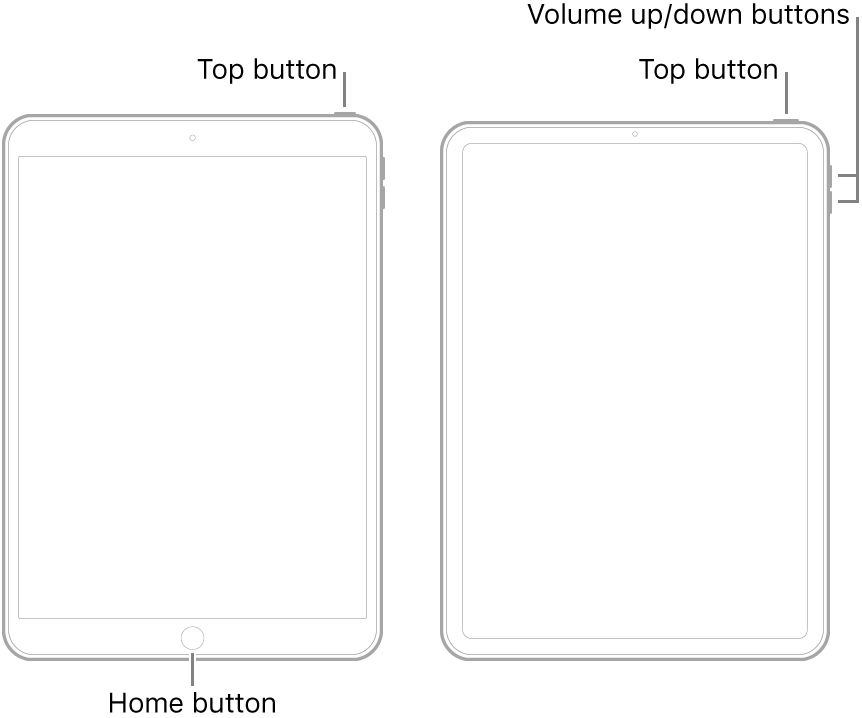
  • On an iPad with a Home button: Press and hold the top button and the Home button at the same time. When the Apple logo appears, release both buttons.
  • On other iPad models: Press and quickly release the volume up button, press and quickly release the volume down button, then press and hold the top button. When the Apple logo appears, release the button.


If you try to break up the handwritten notes into multiple smaller sections, the lag disappears.

To do so, just make a section with normal text. This worked for me, i know it's annoying, but i think it's the only option right now. Here's what i mean:


Hope this helps you :)

Experienced this problem too after updating to IpadOS 16.2. Apple Notes start to lag after certain amount of handwritten text added. Ipad also started loosing batery charge significantly faster, and sometimes Notes app just crashes (I lost some portion of note content, probably cause the cache was cleared).


To me, app in its current state is not usable. I am reverting to IpadOS 15 until this issue will be fixed. This is boggling that we pay so much money for this company products and they just don't work and don't get fixed after 3 months!

I’ve had the same problem on a brand new M2 IPad Pro using a 2nd gen Apple Pencil. At first i thought it was the IPad’s software fault, so i tried handwriting on every single app just to verify it. No lags at all. I feel relieved that it is “just the Notes app”, but i hope Apple will fix it with future updates.

I've just updated my iPad to 16.4.1 and tested the lagging issue, both on short and long notes. It seems all fine, I haven't experienced any lagging.

The only solution I’ve found it’s use an other app to take your notes, now I’m using Notability and the problem it’s solved. If you want the upgraded version of the app you have to buy Notability app that it’s 14€/year

I figured out the issue was related to how often Notes was updating or “fetching data.” Go into your settings and find “Notes.” What worked for me was changing the setting from push to fetch and setting it to fetch data every 15 minutes.


This has to do with your iCloud saves. If your notes are synced across multiple devices and you’re actively using them all, that’s when the frequent fetching occurs. I’ve got my notes set up across three devices myself.


Hope this tip sorts it out for you.

Same issue here! Adding a section resolved the issue. Thanks!

Hopefully this gets fixed though... so we avoid doing this trick

The only way it stop happening is to write with keyboard every some handwriting portions.


I did and it works. It’s not the way we spect but it works.

same here, however, it is the length of the notes, it’s so annoying. i’d be understanding if it was terribly old but it’s the 2020 version! try opening a new note and then merging the pdfs after you’re done, still…annoying af

Done forced restart as said above, tried toggling the iCloud on/off, tried deleting the notes app and reinstalling it. Nothing worked. What can be done next? This is so annoying and as the OP said that particular note becomes unusable because of the lag. I have to create a new note which works for some length and then the lag comes. What else can be done?

I have been having the same problem! I am so glad there is another person with it. I love apple notes but this is a really unappealing bug. More attention to the problem would greatly be apprieated! I believe something changed, maybe a global variable or a "notes" specific change with IOS 16. A possible memory leak created in each note maybe? More testing on this bug and a better answer/fix will help your company!


Also for me specifically, when exporting notes (when I open it in macOS) it doesn't export to a pdf properly and there are blank pages and not all the content is there. I found a work around from another post by using markup (on iPadOS) and then sharing that to my computer (running macOS). But I really shouldn't have to do this and it isn't perfect aswell! I'm running iPadOS 16.1 and am about to update to iPadOS 16.1.1 since I probobly should have done that first before posting this lol. Please bugs if you haven't already!


Thanks!

I have the same problem on my iPad Air. And yes I noticed the issue right after the update to iPadOS 16. Also, coincident with this issue, I have noticed that when using the eraser mode on Apple Pencil (in Notes), it no longer respects tilting (of the Apple Pencil) to either increase or decrease the size of the "erase circle".

also having the same issue on 4th gen ipad air. It used to get fixed after force restarting but no longer does. only thing that has helped was using text to split up the notes but that’s honestly inconvenient and messes up my note formatting

I am in the same boat. Additionally, my laggy handwritten notes on ipad don’t sync with my iphone and the page just appears blank on iphone.


I tried multiple things as well and even tried syncing the note on another older gen ipad pro, but the problem remains. I think this might be a software issue since other ipad has a different chip altogether.