Unofficial archive. This is a read-only, community-run archive of the Apple Support Community. It is not affiliated with or endorsed by Apple Inc.

allow accessory to connect

After i updated to macos Ventura,everytime i connect a usb device i keep getting the message " allow accessory to connect". Unfortunately i cannot change this to "always",because that option is grey.

17 replies

Hi eddy_y2k,


If your Mac is an Apple Silicon model this can be expected behavior. That said, you can tweak this option if you'd like. Check the settings below:


"If you prefer not to manually approve new devices every time you connect them, you can change this setting.

  1. On your Mac, choose Apple menu  > System Settings, then click Privacy & Security  in the sidebar. (You may need to scroll down.) 

  2. Click the pop-up menu next to “Allow accessories to connect,” then choose “Automatically when unlocked” or “Always.”


Cheers!

eddy_y2k,


Thanks. Next, check for any content or privacy restrictions that may be in place.


Set up content and privacy restrictions in Screen Time on Mac - Apple Support


"Set up content and privacy restrictions in Screen Time on Mac

In Screen Time on Mac, set restrictions for web content, purchases, apps, and more.

Before you can set up content and privacy restrictions, you need to turn on Screen Time. See Set up Screen Time for yourself or Set up Screen Time for a child.

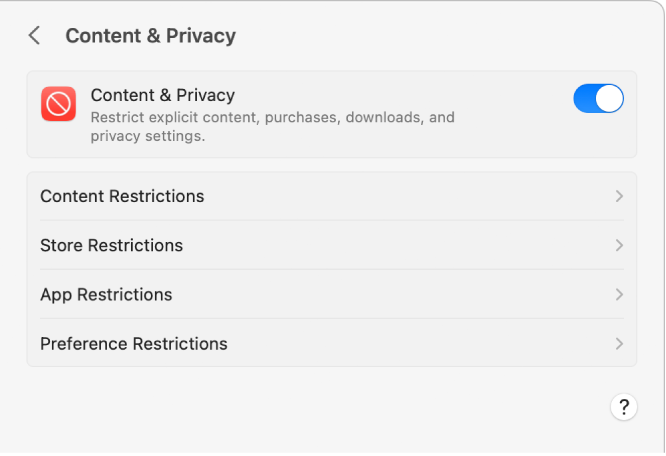
Content & Privacy settings in Screen Time.

  1. On your Mac, do one of the following:
    • If you’re using Family Sharing: Log in to your Mac user account, then make sure you’re signed in with your Apple ID.
    • If you aren’t using Family Sharing: Log in to a family member’s Mac user account.
  1. Choose Apple menu  > System Settings, then click Screen Time  in the sidebar. (You may need to scroll down.)
  2. If you’re using Family Sharing, click the Family Member pop-up menu on the right, then choose a family member.
  3. Click Content & Privacy, then turn it on if it’s not on already.
  4. To restrict web content, click Content Restrictions, then turn options on or off. See Change Content Restrictions settings in Screen Time.
  5. To restrict movies, TV shows, and app purchases, click Store Restrictions, then turn options on or off. See Change Store Restrictions settings in Screen Time.
  6. To restrict apps, click App Restrictions, then turn options on or off. See Change App Restrictions settings in Screen Time.
  7. To lock certain settings, click Preference Restrictions, then turn options on or off. See Change Preference Restrictions settings in Screen Time."


Take care.

Macbook air M1. Ventura 13.1 (22C65)


Still the same. Just saw the permissions message for a few seconds and then closed. This is definitely a bug. Of course, I can use "allow any accessory" as a workaround. But wait, why should I do this? I just want to use my laptop in a simple way.

I have the same problem as well.


I have an older iMac from 2019. These models were based on intel processors, not the "Apple Silicon" mentioned in the help.


Did the recent Ventura OS just eliminate older legitimate Apple iMac Intel based computers from connecting to their own legitimate Apple iPhones? If so, that is terrible planning and communication.


Or, is there still some unexplained reason why many are no longer able to connect their iMac and iPhone.


Please advise.

talljohnson wrote:

Or, is there still some unexplained reason why many are no longer able to connect their iMac and iPhone.

Please advise.

What happens when you plug in your iPhone? I have no trouble connecting my 2017 iMac Pro running Ventura to my iPhone.

talljohnson wrote:

I have the same problem as well.

I should have mentioned, yours is not the same problem. The thread is about connecting accessories to an Apple Silicon Mac, not an iPhone to an Intel Mac.

Simply stated...my iPhone starts charging and that is all.

It does not show up as a connected device.

I have latest SW on iMac-2019 and iPhone11. All have been restarted/rebooted.


The Apple Help indicates to change settings to Allow Accessories, but the setting isn't available to be changed.


I cannot access the "Allow Accessories" section within the System Settings --> Privacy & Security section. See screen shots.


Privacy & Security Section


Searching for allow accessories. Search results find 1 listing (left), but it doesn't show up in the settings (right).


Any other suggestions?

As stated above and in the posted link Allow accessories to connect to your Mac - Apple Support , the "Allow accessories" is only available to Apple Silicon laptops, and in any case, an iPhone is not considered an accessory.


I think you should start your own thread.


Thank you for your reply,but unfortunately I cannot select always,that option is grey.

Hello,i have tried your solution,but it didn't work. For sure Ventura has some bugs,that might be fixed later this year. With Monterey i didn't have this problem.Thank you.

I encounter the same problem


You're welcome.

the "Allow accessories" is only available to Apple Silicon laptops

Then why is it shown in the search results, and clicking on it does nothing?

I have both Silicon and Intel Mac Minis. I cannot see the *Allow accessories* option on either of them.

My one is grey all the time.I have M1 Pro.