How to delete the duplicate photos in Photos app?
elmerfromlanham
 User level: Level 1 (14 points)
How to delete duplicate photos?
Posted on Nov 17, 2022 5:32 PM
User level: Level 1 (14 points)How to delete the duplicate photos in Photos app?
Posted on Nov 17, 2022 5:32 PM

 User level: Level 10 (205,621 points)
Nov 17, 2022 5:57 PM
On macOS 13 Ventura you can let the Photos.app merge duplicates, see: Remove duplicate photos in Photos on Mac - Apple Support (BH)
"You can easily remove duplicate photos and videos from your library. Duplicates appear automatically in the Duplicates album in the sidebar.
 on your Mac, click Duplicates in the sidebar.
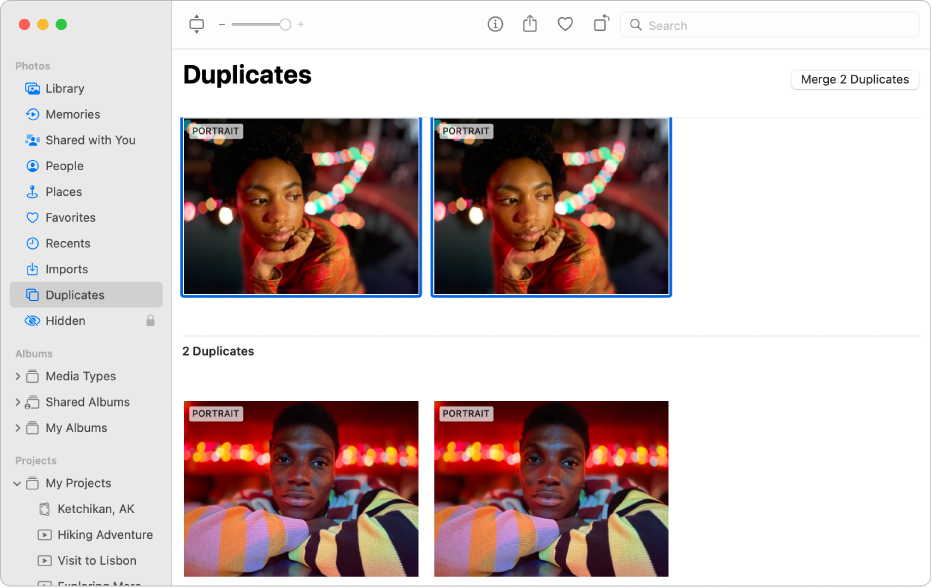
If the photos are having different metadata - titles, descriptions, keyword, I would not use the "Merge" option, but do it like Barney described and merge the metadata myself into the photo I want to keep and then delete the other one manually.
 User level: Level 10 (125,848 points)
Nov 17, 2022 5:38 PM
In the Duplicates, you can select one of the duplicates and delete it like any other photo.
User level: Level 1 (4 points)Dec 2, 2022 12:24 PM
Duplicate photos cannot be merged at this time.
this message keeps coming up when I try to merge more than just a few duplicates...
photos found 13,000 duplicates, but only mergers 50 or so at a time... sometimes more, sometimes less
User level: Level 1 (14 points)Nov 18, 2022 3:57 AM
thank you very much. It works as you indicated.
User level: Level 1 (8 points)Jan 2, 2023 12:18 PM
Hi Happy2,
I am also having this problem. Were you ever able to find out why the system was 'unable' to merge?
Appreciated
Originally posted at discussions.apple.com/thread/254386950