Unofficial archive. This is a read-only, community-run archive of the Apple Support Community. It is not affiliated with or endorsed by Apple Inc.

Screenshot's not cropping

Recently my phone has reversed the cropping of my screenshots and left me with the complete page. Not good for memes, or any other screens that are cropped for a reason. Embarrassing sending something you think is cropped but is not. Thanks apple. Hope this is a resolvable issue. Fing anoing

11 replies

I'm having the same issue and it's driving me mad. I think I know what is happening though: I think that once you crop and press 'OK' you need to wait a second before hitting 'Save'. It seems with the iOS 16 update it takes longer to process the crop and if you hit 'Save' too quickly it saves the uncropped image.

I’ve also been having the same problem and it wasn’t until I read here that I believe it is too related to the last iOS update. When you take a screenshot and crop it (looks cropped when it’s saving) it reverts back to the original image. You have to screenshot. Go back and edit to crop it and then it will save. Lots of extra and annoying steps. Apple hopefully you’ll do a fix soon.

I am having the same issue as of the last update. Taking a screen capture and manually cropping to properly adjust the frame and remove any unwanted image (time, Wi-Fi connection etc) and saving from the screen shot is automatically reversing within photos to a full screen capture without the adjusted cropping. Editing again and cropping a second time does save it correctly. But this is an unnecessary additional step that never needed to be done before.

Hello Bigmind,


To make sure we're on the same page, are you taking the screenshot, cropping, then using Markup? Or are you cropping these screenshots in the Photos app? Are you taking these specific steps: Edit photos and videos on iPhone


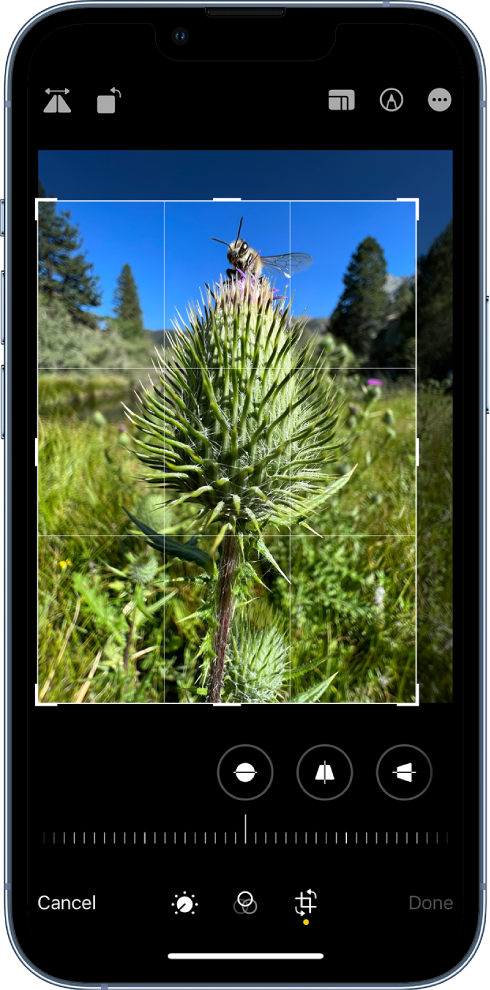
Crop, rotate, or flip a photo or video

1. In Photos, tap a photo or video thumbnail to view it in full screen.

2. Tap Edit, tap , then do any of the following:

- Crop manually: Drag the rectangle corners to enclose the area you want to keep in the photo, or you can pinch the photo open or closed.

- Crop to a standard preset ratio: Tap the Aspect Ratio Freeform button, then choose an option such as square, 16:9, or 5:4.

- Rotate: Tap the Rotate button to rotate the photo 90 degrees.

- Flip: Tap the Flip button to flip the image horizontally.

The crop and rotate screen.

3. Tap Done to save your edits, or if you don’t like your changes, tap Cancel, then tap Discard Changes.


If you're following these steps and the cropping isn't saving or being shared, then it would be best to contact Apple directly: Apple Support


They'll need to take it from here.


Wishing you well, take care.

This has been happening to me on the ipad. I tried the suggestion about waiting before selecting Done and it saved the crop.

Destiny241, sorry to disappoint you, it really does not work properly, before the latest update (as of late 2022) the cropping was not an issue at all; now you crop, it looks like it recorded the cropping of your screenshot, you check the pics and it’s whole - we all know how cropping works; the sensitivity of the saving of the cropping is screwed.

So, Instead of bothering with obvious explanations - Just tell the software developement guys to fix it

thanks.

I’m also experiencing this issue as well. It’s annoying & time consuming to re-crop the pictures and yet, they were all reverted back to original version before they were cropped. Please fix it Apple! And NO, MARKUPS weren’t used.

i am having the same problem too idk if this related to the iOS update or what but I hope this gets fixed soon.

Same thing is happening to me. None of my cropped screenshots are saving.

Yes. This is what I’ve been doing. Works

I have the same problem as above. Screen shot cropped but reverts back to original when used in an application, file, etc.