How do I cancel the APP CoinSnap I have tried on my phone and on computer?
sanerll
 User level: Level 1 (13 points)
Need help to cancel the APP CoinSnap?
Posted on Dec 15, 2022 8:36 AM
User level: Level 1 (13 points)How do I cancel the APP CoinSnap I have tried on my phone and on computer?
Posted on Dec 15, 2022 8:36 AM
Dec 18, 2022 8:31 AM
Hi sanerll,
If you're referring to a recur 00001FBC ring payment or subscription, see options to cancel here:
"How to cancel a subscription on your iPhone or iPad
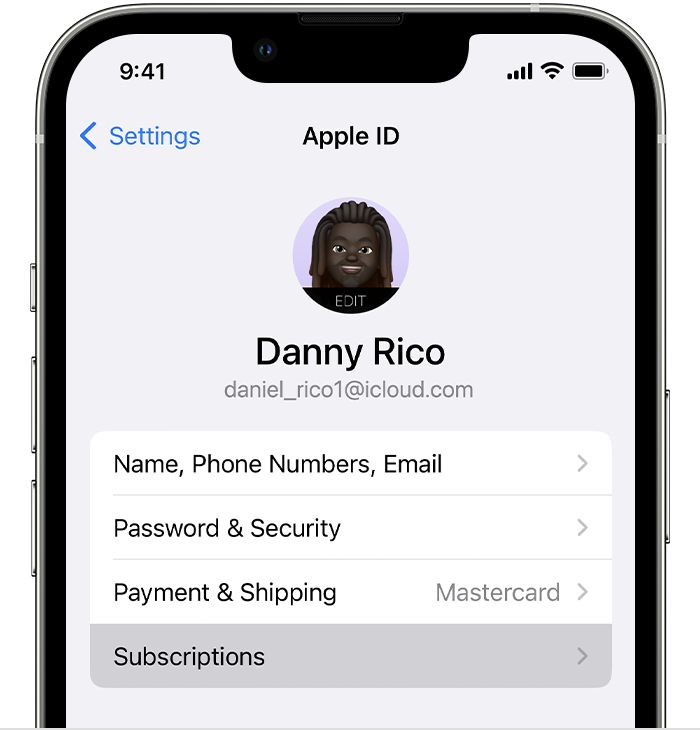
If you can't find the subscription that you want to cancel"
Cheers!

 User level: Level 10 (213,187 points)
Jan 12, 2023 3:43 AM
Having same issue, no option to cancel 1 week free trial. Email I received states:
"Your subscription automatically renews until canceled."
Check here -> About CoinSnap Premium.
Payment will be charged to iTunes Account at confirmation of purchase
• Subscription automatically renews unless auto-renew is turned off at least 24 hours before the end of the current period
• The account will be charged for renewal within 24 hours prior to the end of the current period, and identify the cost of the renewal
• Any unused portion of a free trial period, if offered, will be forfeited when the user purchases a subscription to that publication, where applicable
• Subscriptions may be managed by the user and auto-renewal 00004000 may be turned off by going to the user's Account Settings after purchase
User level: Level 1 (8 points)Jan 11, 2023 8:10 AM
Cannot get to cancel subscription on the CoinSnap App
User level: Level 1 (12 points)Jan 12, 2023 3:31 AM
Having same issue, no option to cancel 1 week free trial. Email I received states:
"Your subscription automatically renews until canceled."
Originally posted at discussions.apple.com/thread/254468757