Hi, I no longer see the "revert to original" opinion in my Mac photos. How can I get back the original photo?
Revert to original option in Photos
Posted on Dec 19, 2022 1:52 PM
Hi, I no longer see the "revert to original" opinion in my Mac photos. How can I get back the original photo?
Posted on Dec 19, 2022 1:52 PM
Dec 20, 2022 8:09 AM
Not having "Revert" means Photos thinks it's showing you the original. Are you sure it's not the edited version that is no longer visible?
Are you syncing your Photos with iCloud? If so, what do you see at iCloud.com?
Try these things that we always try first:
Start up your Mac in safe mode - Apple Support
One of these steps may fix the problem, but their failure to work is also diagnostic.
Dec 20, 2022 9:16 AM
One more thought: You can easily check, which photos have been edited and can be reverted to the original.
In Photos , in the View menu > Metadata, set the checkmark for "Edited". Then all edited versions will be showing a badge overlay with three sliders. Or use the "Showing Only" filter, and filter by "Edited". This way you will only be seeing edited photos. For example:
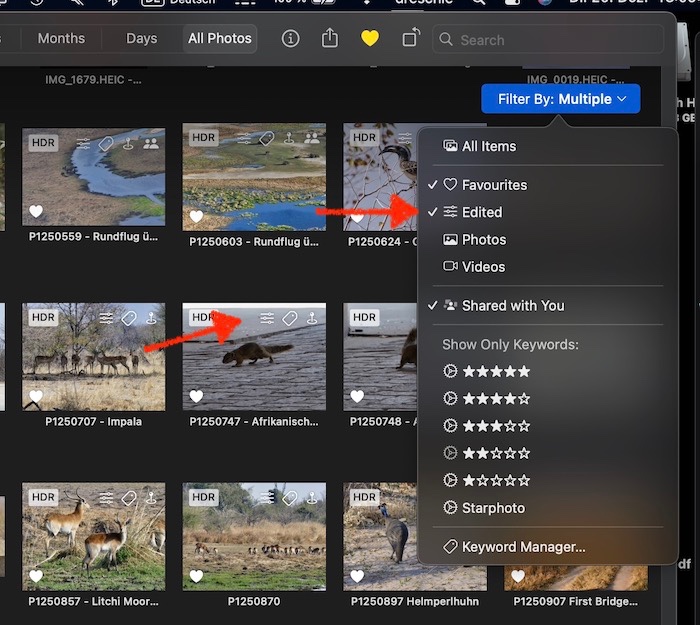
If the photo is marked as edited, but you can still not revert it to the original, the original might be missing. This could mean, that Photos cannot download it from iCloud, or a referenced original cannot be accessed, or that your Photos Library is damaged in some way, for example by an unsuitable cleaning tool to remove duplicates.
Originally posted at discussions.apple.com/thread/254480155