Unofficial archive. This is a read-only, community-run archive of the Apple Support Community. It is not affiliated with or endorsed by Apple Inc.

Shared Outlook calendar not visible on macOS calendar

Dear community,

in my Outlook for Mac app I’m able to see all my calendars even the shared ones. When I connect my Exchange account with the calendar app of macOS, only my calendars and not the shared ones are visible. For iOS everything works fine. I already tried to delete the account and add it again. Does somebody have experience with this problem? Thanks for the help!

6 replies

Adding shared calendar to Mac Calendar App

Open Calendar

Go to Calendar menu and choose preferences

Choose Accounts / Select the email account / Delegation

For each calendar press the + and type in the name

After clicking the name that is found click the "show" box

I am having the same problem.


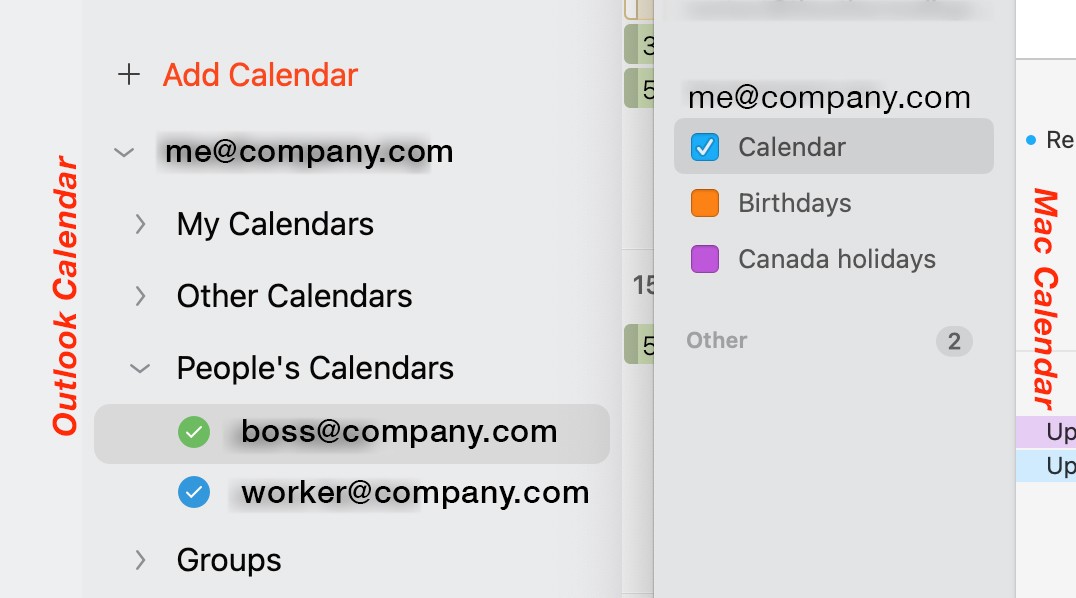
My boss and coworker at @company.com has shared their Outlook calendars with me. I can see their calendars on my iCal app on my phone, but not on my desktop or laptop. Everything I've read about delegation doesn't work, it says I don't have permission to do so. How can it be this difficult?


I'll add this, it worked on my desktop. But when I recently tried to get it work on a new laptop, suddenly it stopped working on my desktop too. Don't know what I did wrong.


I hope this bumps the issue back to the top and maybe someone from Apple can answer.


Image: On the left is my Outlook calendar that shows my boss and coworker's calendars. The right is my Mac Calendar that won't show me my boss or coworker's calendars eventhough (1) it worked for a while on my desktop and (2) still works on my phone.


My experience was so irksome with Outlook I gave it up about 10 years ago. Nor a solution, I get that, but Outlook just never worked well for me in situations like you're describing.

Has anyone found a solution to that? Thank you

.

Did you ever get this to work?