Well, reassure us about the hard drive, anyway-- How is it formatted? An external drive must be formatted in either APFS format or Mac OS Extended (Journaled) format. Additionally, the drive can not have had Time Machine on it since it was formatted. Have you checked the "Ignore Ownership" box?
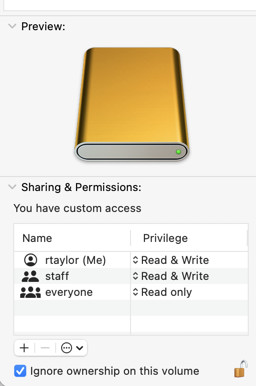
And with that out of the way, try some other tricks, like these, some of which you may have already done:
- Restart the computer (of course)
- See if it's about the user account: make a new user and see if the same problem recurs with it
- Use another library if you have one, or make a small test Library with a few pictures in it and see if the same thing happens. You could make a small Library on your internal drive, see if it works, and then move it to the external drive.
- Start in Safe Mode (different for different computers, so see the link) This bypasses certain potentially disruptive processes.
Start up your Mac in safe mode - Apple Support
One of these steps may fix the problem, but their failure to work is also diagnostic.