Moved to lower right hand corner of Home Screen. Relocate back to the top of the screen.
Manche54
 User level: Level 1 (4 points)
How do I move location of status bar?
Posted on Aug 28, 2023 2:29 PM
User level: Level 1 (4 points)Moved to lower right hand corner of Home Screen. Relocate back to the top of the screen.
Posted on Aug 28, 2023 2:29 PM
User level: Level 1Aug 29, 2023 10:43 AM
Hi there Manche54,
If the status bar doesn't appear at the top of the screen on your iPhone, start by checking to see that you don't have Portrait Orientation Lock turned on:
1. Swipe down from the top-right corner of your screen to open Control Center.
2. Tap the Portrait Orientation Lock buttonto make sure that it's off.
3. Turn your iPhone sideways.
You'll find those steps here: Rotate the screen on your iPhone or iPod touch - Apple Support
If that doesn't help, try restarting your iPhone to see if that resolves the issue:
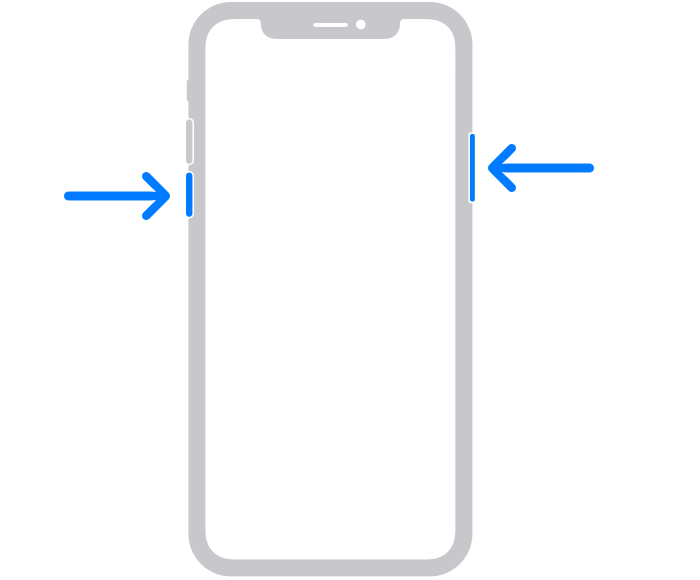
1. Press and hold either volume button and the side button until the power-off slider appears.
2.
3. Drag the slider, then wait 30 seconds for your device to turn off. If your device is frozen or unresponsive, force restart your device.
4. To turn your device back on, press and hold the side button (on the right side of your iPhone) until you see the Apple logo.
The steps to restart can be found in this support article: Restart your iPhone - Apple Support
If the issue persists, make sure your iPhone is running the latest software version, which is iOS 16.6. You can see the currently installed version listed in Settings > General > About > Software Update. If needed, learn how to update your iPhone here: Update your iPhone or iPad - Apple Support
Take care.
Originally posted at discussions.apple.com/thread/255093426