Unofficial archive. This is a read-only, community-run archive of the Apple Support Community. It is not affiliated with or endorsed by Apple Inc.

iCloud Keychain and Passwords not working

Under Settings --> iCloud --> iCloud Passwords and Keychain "Sync this iPhone" is enabled.

But whenever i try to use passcode to sign in it redirects me back to this settings saying i have to turn it on.


When i try to toggle it on and off nothing is really happening.

If i toggle off and restarts phone it appears off, i then toggle on but it still seems like it isnt actually on.


On my macbook it works for the same apple/icloud id.


Does anyone have any suggestions?

4 replies

Thanks for your help but it was finally my wife that resolved the issue.

I contacted Apple Support and they didn't find the solution but my wife suggested "Log out of iCloud and log in again" (on the phone).

And now it works!

Now also the screen time requests comes through on my iPhone. They stopped doing that after upgrading to iOS 17.

But now all seems good, I even used passkey to sign in here :-)

Hi niclasl1984,


Thanks for using Apple Support Communities. We understand you are running into an issue with iCloud Keychain, and we're happy to help. Start with the steps to ensure iCloud Keychain is set up correctly with the steps here: Set up iCloud Keychain - Apple Support


Thanks.

Thanks for your reply :-)

But yes, I have done that one multiple times trying to enable/disable.

Hey niclasl1984,


If this is only happening on your 00004000 iPhone, we suggest making sure the software is updated to the latest version. Outdated software can cause things to misbehave:


  1. "Back up your device using iCloud or your computer.
  2. Plug your device into power and connect to the internet with Wi-Fi.
  3. Go to Settings > General, then tap Software Update.
  4. If you see more than one software update option available, choose the one that you want to install.
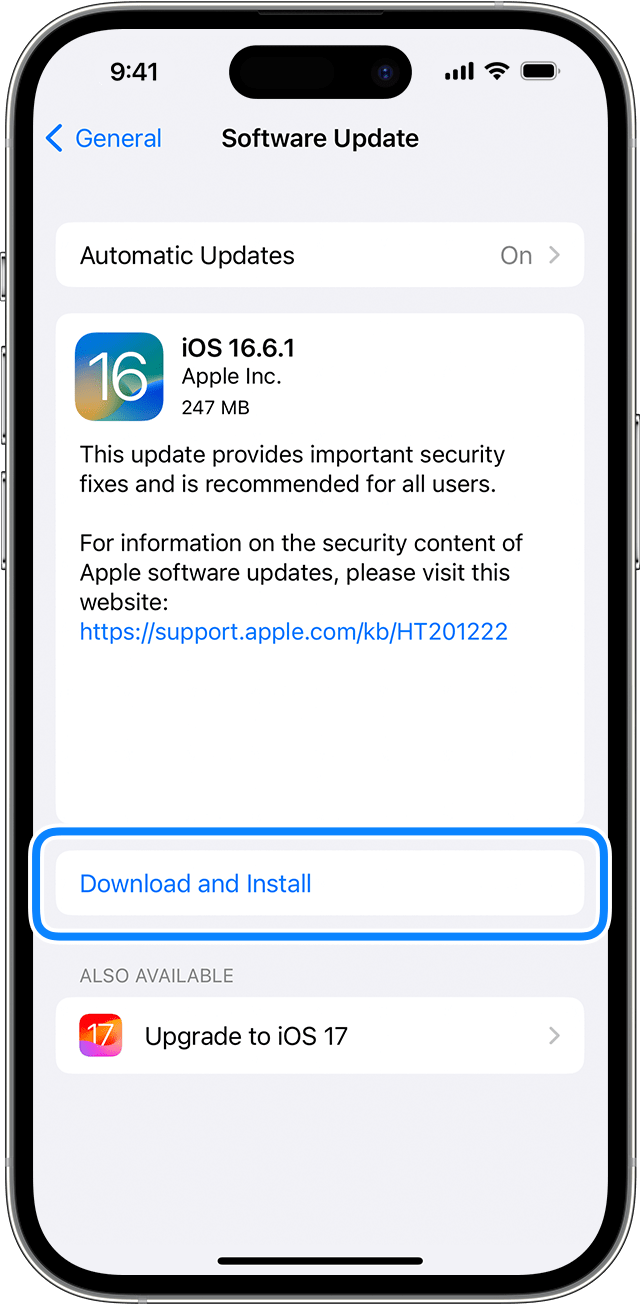
  5. Tap Install Now. If you see Download and Install instead, tap it to download the update, enter your passcode, then tap Install Now. If you don't know your passcode, learn what to do."

An iPhone showing the option to download and install the update

-Update your iPhone or iPad


Should the behavior continue, contact Apple Support to look into this further with you.


Cheers!