Unofficial archive. This is a read-only, community-run archive of the Apple Support Community. It is not affiliated with or endorsed by Apple Inc.

How can I share iCloud storage with my family?

I cannot share ICloud storage with my family members.

  1. When I Go to Settings > Family. 
  2. Tap Subscriptions.
  3. Tap iCloud+. I see that I included into my previous family members, but I purchaa sed new cloud plan and what to share it with new family members


[Re-Titled by Moderator]

5 replies

marichka256,


If you see a list of a previous family, you would need to remove yourself first.


These steps can guide you:


"Remove yourself from a family group

Any family member age 13 or older* can remove themselves from a family group. If you have Screen Time turned on for your account, the family organizer must remove you. 

On your iPhone, iPad, or iPod touch


  1. Go to Settings.
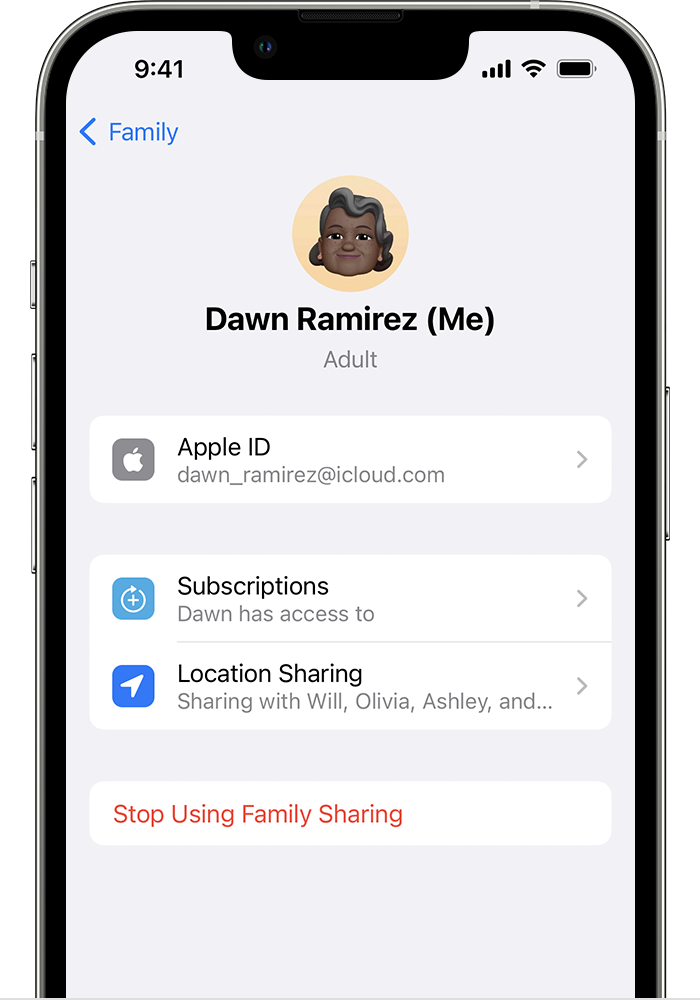
  2. Tap Family. If you don't see Family, tap your name, then tap Family Sharing. 
  3. Tap your name.
  4. Tap Stop Using Family Sharing. Stop Using Family Sharing is located below Location Sharing."


Additional details can be found here: Leave Family Sharing


After leaving your previous family, then attempt top set up/join a new family and share your iCloud storage.


Let us know the results.


Cheers!

Hi marichka256,


Thanks for contacting Apple Support Communities!


We understand that you need some help to share your iCloud+ subscription with your family sharing group, correct?


This is a handy resource which explains step-by-step how to set up iCloud+ to share with your family: Share iCloud+ with your family - Apple Support

"Share iCloud+ with everyone in your family

To share iCloud+, you need iOS 11 or later, iPadOS, or macOS 10.13 00004000 High Sierra or later. For the best experience, make sure that your family members' devices meet these requirements, too.

Learn what to do if a family member already has iCloud+


On your iPhone, iPad, or iPod touch

In iOS 16 or iPadOS 16 or later:

  1. If you haven't set up Family Sharing yet, set up Family Sharing. 
  2. Go to Settings > Family. 
  3. Tap Subscriptions.
  4. Tap iCloud+.
  5. Follow the steps to share your existing plan.
  6. Use Messages to let any family members with an existing iCloud+ plan know that they can now switch to your shared iCloud+ plan."

We hope this helps you.


Kind regards.


Thanks for getting back to us marichka256,


We would suggest getting in touch with Apple Support directly as the next step. They'll be able to further investigate the issue with you. You can reach them here: Get Support


Have a wonderful day.

Thank you for the answer but It did not help as after those steps:

If you haven't set up Family Sharing yet, set up Family Sharing. 

  1. Go to Settings > Family. 
  2. Tap Subscriptions.
  3. Tap iCloud+.

I see list of my previous family, but now I created new family and want to share my individual ICloud plan which new family members

Thanks for the answer, but the problem is that here:

  1. Go to Settings.
  2. Tap Family. If you don't see Family, tap your name, then tap Family Sharing. 
  3. Tap your name.
  4. Tap Stop Using Family Sharing.

I see my new created Family

  1. and here Go to Settings > Family. 
  2. Tap Subscriptions.
  3. Tap iCloud+.

I see list of my previous family, and cannot remove myself from there. organizer of previous family did not see me in the list of family members

something strange, do not now how to fix it. I tried logging out and log in, install the latest updates, runoff, and turning on the device, but no success