Unofficial archive. This is a read-only, community-run archive of the Apple Support Community. It is not affiliated with or endorsed by Apple Inc.

"Keep your Apple Account safe and secure" Email

I received an email from this address and cannot find any information online about it, says that it’s possible to spoof sender and its message starts with, “Setup some peace of mind by knowing how to reset your password, update your…”

I opened it once to look at it, didn’t click any links.


[Re-Titled by Moderator]

31 replies

Valid97 wrote:

How do you know? Did you open it?


If iPhone or iPad Safari is set to view links (rather than set to preview the target webpages), then (for instance) pressing and holding on the red-circled “go to” link (shown below) won’t be an Apple.com domain. Or won’t be whatever other website or service the particular scammers are trying to phish.


In Mail app, press and hold on the “from” in top of the message to view the sending email address, too. The green-circled detail (the sending address) usually won’t be Apple. Or whoever the scammer is trying to phish. This test is less reliable though, as the sending email addresses can be spoofed. Unlike the sending email address, the action links embedded in the spam message can’t go to Apple.com for the phishing to work, so those embedded links can’t be as easily spoofed.
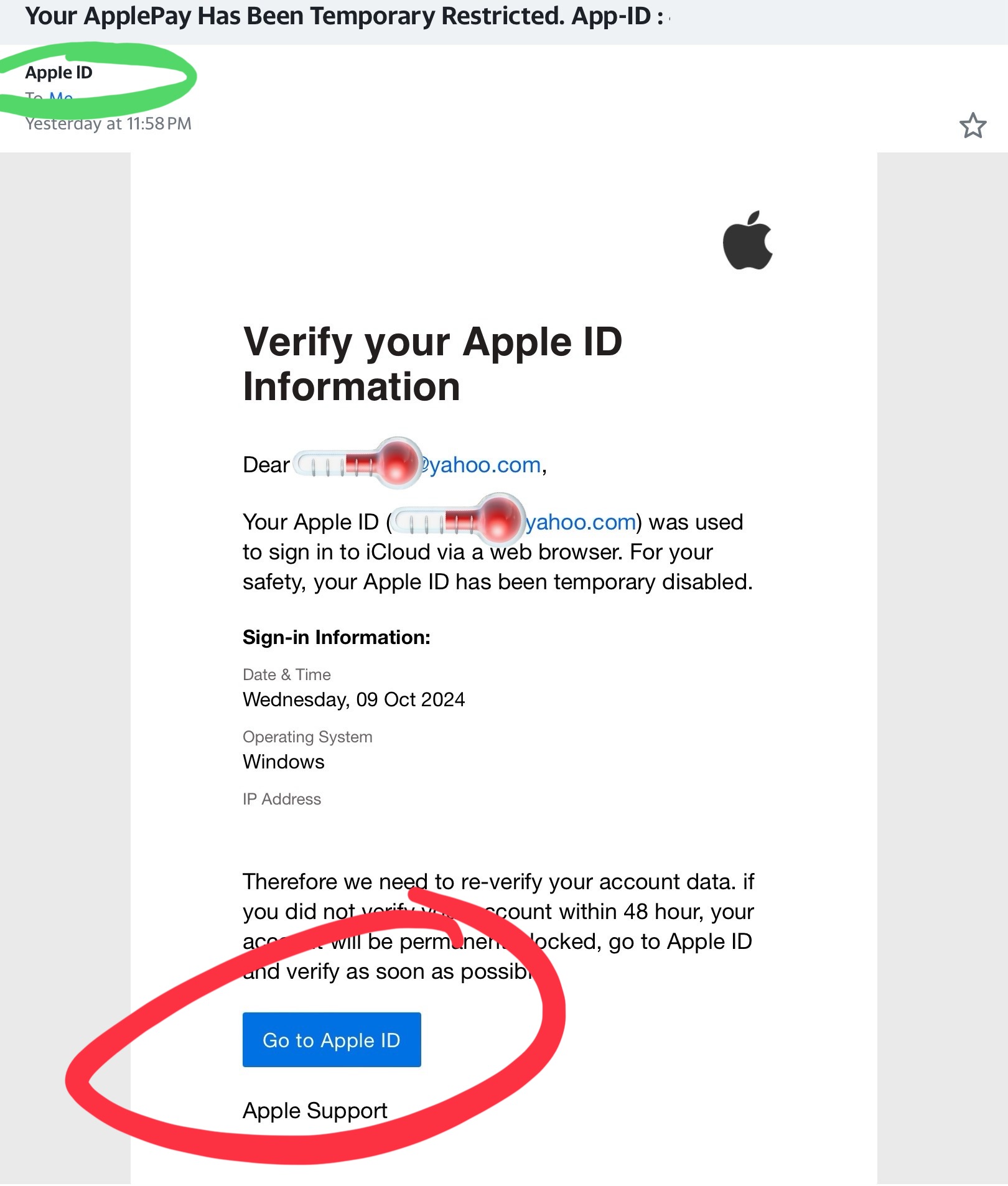


If not familiar with Safari settings, here is how to view a link (circled in blue):
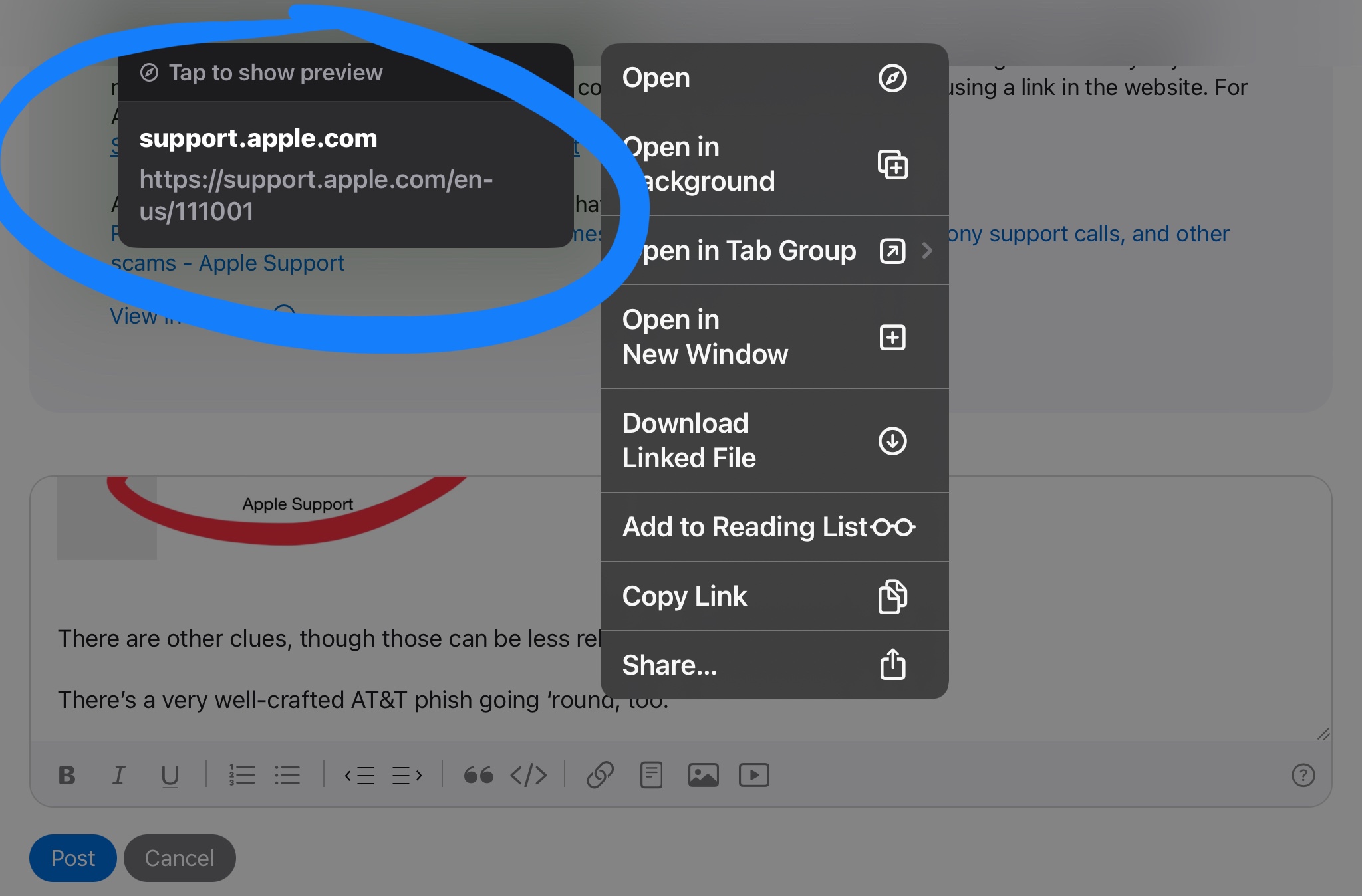

If you see the “tap to show preview”, you’re viewing the link. Which is the mode you want here. And in this case, the link shown (again, in the blue circle) shows an Apple.com link.


If you see the following (this is preview mode, with “hide preview” shown circled in yellow), then tap Hide preview:
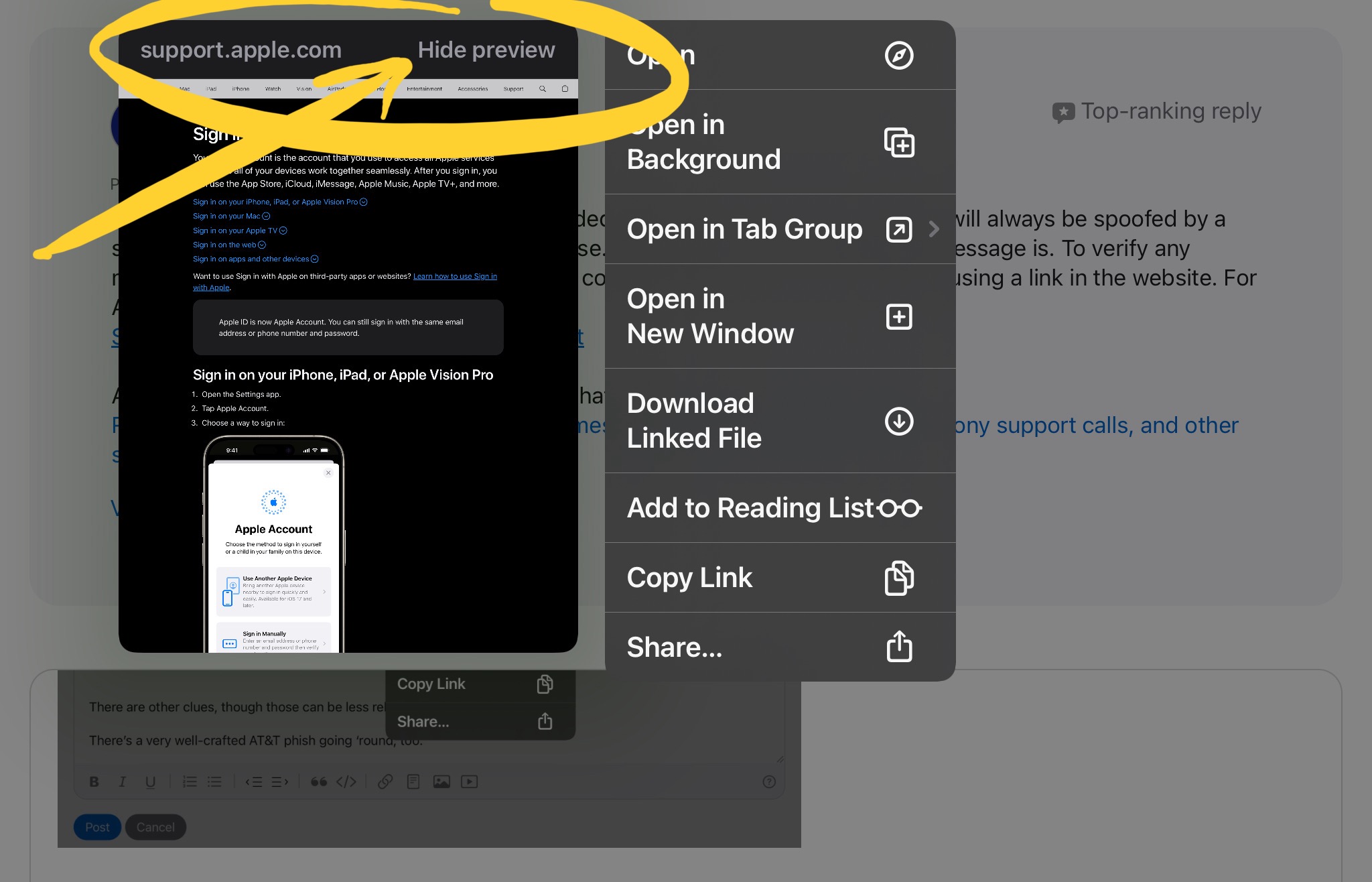


Safari remembers this setting too, and I usually have it set to view links / hide previews. To set the link-view or webpage-preview setting mode using some benign link, such as the links used on most any webpage you normally visit, press and hold on one of the links embedded in the webpage. Best don’t test or switch the Safari viewing modes right on a spam or scam message, though.


There can be other clues, though those can sometimes be less reliable with all the data breaches happening.


There’s a very well-crafted AT&T phish email going ‘round, as well. That phishing email is easily detected by the embedded links not going to AT&T.


WhyCantISayMyName wrote:

I think my account has been compromised because I’ve not been keeping up with my passwords. I’ve been working on updating all of my passwords/security measures based on information provided through the Apple helpline and was shocked to see the amount of dark web exposure that Google uncovered for my gmail account. 37 instances — I’m going to be following all the recommended measures from Apple as well as Google.


Anything referencing “dark web” is best initially assumed unserious, until proven otherwise; assumed to be entertainment, advertising, sketchy, or quote possibly a scam.


Email addresses are not and cannot be secret.


And knowing an email address does not provide access to the account.


Password re-use is, however, approximately doom. Password stuffing is very common, and various services can be breached.


You can see some of the various services that have leaked your credentials at haveibeenpwned.com — and some of those will have used weak or too often no security for their password storage.


Most sites where an email address is provided should be assumed to have sold it, unless the fine print says otherwise. And even then, they can either lose it or sell it.


Enable two-factor authentication, use unique and robust passwords, and use a password manager such as iClpud Keychain. (If the passwords are unique, account compromises don’t have any effects past the compromised service itself.)


Better Securing Your Data, and Apple Account - Apple Community


Call Apple and ask them.

Refer to this page for Apple Support features ➔ Contact - Official Apple Support

Select from the presented options until you find a solution for your issue, or see if there is a chat or phone call contact method offered lower on the page (you sometimes have to narrow down the options multiple times before this is shown). If you do not see your issue, keep experimenting with any series of selections until you reach one that offers a chat session or a telephone call and get the representative to redirect you.


This support article has various country telephone numbers for contacting Apple for support and service ➔ Contact Apple for support and service - Apple Support


Hi, cybersecurity proffessional here. I too recieved this email. All the links contained in the email are legitimate Apple domains.


The email address [email protected] is also a legitimate Apple email address.


[Edited by Moderator]

The message headers show that DMARC, DKIM and SPF record checks have been passed.


It looks legitimate as the email came from authorised apple servers.

Probably the most unwise and amateurish but apparently legitimate mail they ever sent out. So unusual for legit Apple messages to be swallowed up by so many junk filters, but these were. That kinda shows how unwise this mail was.

I reported it as suspected phishing.

It’s apples email address. Not a fake account.

lizardscrazy wrote:

I received the email on an email that’s not even linked with Apple. I had to search it up because how is it verified?


BIMI was found lacking at least once already, and other issues being found by scammers would not surprise.


Real or not, the original message certainly looks like a scam, too.

In my case I'm extremely careful because my phone was stolen recently, I already received 3 scam text messages with bogus links that obviously I ignored, so any unsolicited emails or texts asking to login onto my account I delete

A copy of the message arrived here 00004000 , as did a notification and a 🔴 in Settings app indicating iCloud sync issues.


The links I checked in the mail message body looked okay, though it’s also possible to look up the associated Apple article links yourself, and use those links to add a recovery contact and a legacy contact, or whatever else.


Looks legit.

I received the email on an email that’s not even linked with Apple. I had to search it up because how is it verified?

I was nervous at first when I clicked it, but email looks legit "verified logo" and I also get other e-mails from a similar address "deve*****@insi*******.apple.com" Which is my developer e-mail mailing list I signed up for ( photo below)


Also the real Apple Developer e-mail I get brings me to a legit Apple site / YouTube channel and when I hovered over the bottom I also see c.apple.com..... and it's a legit apple site.


[Edited by Moderator]

My default on this matter is Geniuine or not; if its Unsolicited, I just delete the email. Seems rather silly of Apple to do something like this unless they're Base-Lining User's Info.......not sure what?!

I have read online that a lot of people have clicked on the link and have gone to the Apple site. The site seems to be genuine but unless Apple tells us it is them and not a scam I won’t be giving any information to them via the link.

The email is still sitting in my junk waiting to be deleted.

It’s a genuine link.

I got similar emails today, seems very suspect. Stay vigilant

Have had a few emails regarding Apple Account today which initially spooked me and seemed suspicious.


I still don't know.


There's a tatty Apple logo with irregular edges, but oddly I'm told it's a 'verified logo' - so the loo's ok, but does that mean the email is genuine and not a phishing attempt.


Apple Account rollout does not seem very reassuring to me.


Have had a few emails regarding Apple Account today which initially spooked me and seemed suspicious.


I still don't know.


There's a tatty Apple logo with irregular edges, but oddly I'm told it's a 'verified logo' - so the looks ok, but does that mean the email is genuine and not a phishing attempt.


Apple Account rollout does not seem very reassuring to me.


I clicked the link and put my details in to log in and it send me the Apple ID Verification Code to my iPhone. I had to say that it was me to continue then my phone gave me a code to input - just like when you log into Apple on web. Doesn't this mean it's not a scam, or can some scam websites do that?

I’ve been highly confused over the last several days. Thank you for this question, GoodQAvgA. I came here also hoping to verify if [email protected] is a legitimate address. I’m not sure if I’ve come any closer to answering this question. I hope to find out what’s going on. Search results have been hard to sort through.

There seems to be a lot of debate in the threads if this is phishing. It's really hard to tell with this one since it looks like a legit email address. The only emails I get from apple is that my cloud storage is full or emails from apple support. Is this a first time for everyone seeing that email?


I think my account has been compromised because I’ve not been keeping up with my passwords. I’ve been working on updating all of my passwords/security measures based on information provided through the Apple helpline and was shocked to see the amount of dark web exposure that Google uncovered for my gmail account. 37 instances — I’m going to be following all the recommended measures from Apple as well as Google.

How do you know? Did you open it?

I and my daughter have also received this email and we both thought it was a scam and sent it to junk


Is it genuine or not?

I’m still getting the little spinny wheel… why can’t I add myself to the list of people who’ve experienced this issue?


Same exact thing with me.

yep shows Verified logo, its from Apple.

I received that too. What if I accidentally clicked the link from the email?

I must of spoken to soon now I am getting flooded with emails from this chain lol. Let's close it!

Tap on the blue bell at the top of the thread so it goes white.

ok I clicked on it I don't understand what that does