Unofficial archive. This is a read-only, community-run archive of the Apple Support Community. It is not affiliated with or endorsed by Apple Inc.

Is it possible to digitalize DV tapes from Sony HVR-M15AU into iMovie?

is it possible to digitalize DV tapes from Sony HVR-M15AU Desktop HDV VTR into mac book pro OS 13.5 imovie or FCP10 (HDV out from Sony player into adaptor mini do into another adaptor USB3.1? I've tried with a mac book from 2008 (with adaptor mini dp ) and the Sony player is not recognized.

thx for you help...


[Re-Titled by Moderator]

10 replies

The only way of transferring HDV or DV to a computer is via Firewire which has not been included on Macs for over a decade. So you really need an old Mac to capture and then transfer the files to your newer machine.


You can buy very expensive Firewire to Thunderbolt converters (you may need several) but there is no guarantee they will work.


A cheap alternative which will provide lower quality is to buy a video to USB converter from the likes of Amazon.


Video Capture to USB Converter


I have never used such a device so I cannot comment on the video quality they produce.

Yes, in theory it is possible to capture mini DV tapes into both iMovie and FCP from your Sony deck.


Greater success is achieved by using an older Mac with FireWire ports rather than the later models that require one or more adaptors to be attached to the FireWire cable connected to you deck or DV/HDV camcorder.


So ,dealing with your " old mac book from 2008 " I assume this is actually a MacBook Pro 2008 as a MacBook 2008 does not have FireWire ports, as far as I am aware, but could be wrong.


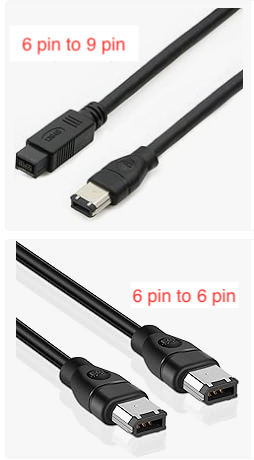
As your Sony deck has a FireWire 400, 6 pin port, can you confirm that you are using one of the below cables to connect your deck to your 2008 Mac? You mention that you are using an adaptor ( you say mini dp?) with the 2008 Mac, could you provide a pic of that adaptor?

Are you using the 6 pin to 6 pin or 6 pin to 9 pin?


thx for your reply.

there is a Thunderbolt symbol at the end of the adaptor.

Mac Book (13-inch Aluminium, Late 2008)

from what I see online, this mac book only has a mini diplsya port, which looks like thunderbolt but isn't...


To amplify what the surreyfriends' said: The port on the Mac must be a ThunderBolt port. Not mini display port, not USB.

The white adaptor looks as though it is a FireWire to Thunderbolt adaptor.


I assume you are plugging the small end into the display port of the 2008 MacBook .????

You cannot use this display port to input from your deck. The display port is an output port only.

I don’t believe there is a way to connect your deck to your 2008 MacBook.


Apple menu > About this Mac was for your newer MacBook Pro running OS 13.5 .If this MBP has the Thunderbolt 3ports ( USB-C type connectors) then you will need the additional Thunderbolt1/2 to Thunderbolt 3 adaptor to use along with the white adaptor that you have already shown.

If you can plug your current white adaptor into you MBP 13.5 then you don’t need any additional adaptors.

If you can confirm model year of MBP then I should be able to confirm if you need the additional adaptor.

As has been mentioned here earlier, the capture of tape with these adapters on more recent Macs can be troublesome.

Can you tell us the model year of your MacBook Pro? To check, click on the Apple logo top left of screen > about this Mac. Do not post details of any serial number.

Does the small end of the white adaptor have a Thunderbolt symbol as shown on this pic?

If so then this is one of possible 2 adaptors required . Depending on model year you may require a second adaptor called Thunderbolt 1/2 to Thunderbolt 3. The Thunderbolt 3 end has a USB-C type connector.


thanks for your reply

my old mac is a mac book late 2008 with OSX Yosemite. with a intel core 2 duo processor.


My MacBook Air has a mini-Display port, but no Thunderbolt.