Unofficial archive. This is a read-only, community-run archive of the Apple Support Community. It is not affiliated with or endorsed by Apple Inc.

How to fix unresponsive scrolling on iPad mini 6 after updating to iPadOS 26.2.1?

Hello all, I've just updated my iPad mini 6 to 26.2.1 and now found it has become unusable. I have a disability that effect my hands. The screen no longer scrolls smoothly when it actually scroll. I can flick the screen and nothing happens then it will suddenly move in the direction of the flick. Trying to move to another screen is a nightmare as it takes ,multiple attempts. I'm actually typing this on a android as I can't use my iPad.

After a Google there is loads and loads of thread with the same issue but no solution

Any ideas.


[Re-Titled by Moderator]

Original Title: 26.2.1.scrolling issue

23 replies

Be aware that your iPad may appear sluggish immediately following update as many background housekeeping tasks will be running. Any performance impact should be temporary - and for a point-update should clear with a few hours. By contrast, if you have applied a major version update (e.g. updating from iPadOS 18.x to iPadOS 26.x), reindexing the filesystem and assets may take a day or two. Leaving the iPad connected to its Power Adapter while housekeeping tasks conclude can speed the process.


If your iPad is not operating as expected, try a forced-restart - as this will often clear an isolated or post-update software issue:


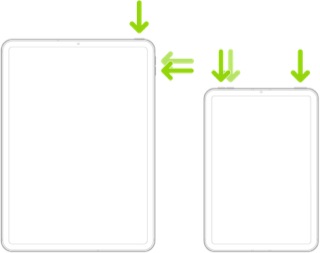
Force restart iPad (models with Face ID or with Touch ID in the top button)

If your iPad doesn’t have the Home button, do the following:

  1. Press and quickly release the volume button nearest to the top button.
  2. Press and quickly release the volume button farthest from the top button.
  3. Press and hold the top button.
  4. When the Apple logo appears, release the top button.


If the problem persists after performing the restart, it may be necessary to reset your iPad settings. While this reset will not cause any loss of data, as a precaution, it is always wise to ensure that you have a current iCloud or iTunes backup before performing the reset:

How to back up your iPhone, iPad, and iPod touch - Apple Support


When you are happy to proceed, you can perform the reset from iPad settings:

Settings > General > Transfer or Reset iPad > Reset > Reset All Settings


If the problem still doesn’t clear, the next step is to reset the iPad to factory settings:

Restore your iPhone, iPad, or iPod to factory settings - Apple Support


Otherwise, you would be best advised to seek assistance directly from Apple Support. You can contact the Support Team using the Support link at top-right or bottom-left of this page. Alternatively and perhaps easier, you can initiate and manage your support cases using the excellent Apple Support App. If not already installed on your iPad, the App can be downloaded from the App Store:

https://apps.apple.com/app/apple-support/id1130498044


You might also visit the Genius Bar at your local Apple Store or Apple Authorised Service Provider (AASP) - where the technicians will be able to test and assess your iPad - and you can explore your available options:

Genius Bar Reservation and Apple Support Options - Apple

For me this appears to be related to the apple pencil. The problem starts when I use the pencil and if I turn off bluetooth the problem goes away.

This is happening to me too. Force restarts don’t work, nor does resetting to factory. Immediately after a force restart, the screen behaves normally. Within a few hours, it no longer responds to swipes. I can tell the iPad is picking up touches and taps, but swiping is not possible. Even with an Apple Pencil, swiping is not possible. I’ve restored the iPad twice, and still no improvement.


Adding my experience because I sent the iPad in for repair, thinking maybe it’s the screen, and Apple “couldn’t duplicate the issue”. They’re sending it back. I’m definitely interpreting that as coded language; I’m willing to bet it’s a software issue that will persist even if they sent me a new iPad, so they’re simply choosing not to replace it. Your mileage may vary, but I wouldn’t waste time trying to get them to repair it. Hopefully if more people share their experiences, they will notice the issue and come up with a fix.

After months of scrolling problems, I can contribute that the only thing that helps is rebooting. After that, scrolling works normal for a matter of hours or days. But then the scrolling freezes again. I have adjusted settings as suggested, but that has no impact. This is clearly a bug. It’s so freaking frustrating.

JohnnyB1968 wrote:

Still have the issue apple please get your finger out and fix the issue


Please understand the Apple Support Community is a user-to-user technical forum. Contributors here are all end-users, just like you. Other than the site Moderators, Apple neither monitor nor participate here.


As such, if you anticipate that Apple will see or act upon anything that you post here, you will be disappointed.


If you have a problem that you are unable to resolve, you would be best advised to seek assistance directly from Apple Support. You can contact the Support Team using the Support link at top-right or bottom-left of this page. Alternatively you can initiate and manage your support cases using the excellent Apple Support App. If not already installed on your iPad, the App can be downloaded from the App Store:

https://apps.apple.com/app/apple-support/id1130498044


You might also visit the Genius Bar at your local Apple Store or Apple Authorised Service Provider (AASP) - where the technicians will be able to test and assess your iPad - and you can explore your available options:

Genius Bar Reservation and Apple Support Options - Apple

Have contacted Apple Support as suggested? If not you should do so - as this is your only option for remote diagnostics/support.


By contrast, the Genius Bar offers hands-on support - but obviously requires that the iPad is presented to the technicians at an Apple Store or Apple Authorised Service Provider (AASP). Be aware that an AASP may be much closer than your nearest Apple Store.


The only remaining option is to consider Apple's mail-in repair service:

iPad Repair and Service - Apple Support


nessie243 wrote:

Hey. I tried to power off my IPad OS 20 because it didn't slide. But then when I tried to slide to power off, it didn't slide. Please help!!


If you are having difficulty shutting-down your iPad, you can easily do so from iPad settings:

Settings > General > Shut Down

Manullascard488 wrote:
It just happened again on my iPad Pro 11in 4th gen after 1 month. The scrolling gesture stopped working pretty randomly while I was scrolling on Apple Music, and I had to restart it once again. After restarting the iPad everything went to normal for a litttle while, but now even VoiceOver is misbehaving. The typing experience is pretty weird, you don’t know how much I'm struggling with the braille input using Voiceover. It types weird Greek letters, it randomly disappears and I can’t type any punctuation because it doesn't work properly , so I desperately need help from someone from Apple. Even if I have an opened case from Support, nobody is willing to help. I‘ve asked them for a replacement at least 5 times cause my iPad still is under warranty, but they told me that the warranty has expired, even if I have less than 2 years with the devise. They schedule calls that never happen, and in the end nobody helps.
Is there a workaround to fix this bug without having to restart the iPad every time it happens?


If you are experiencing difficulties with Apple Support, you should contact them again using whichever channel works best for you - and request an escalation. Don't forget, you can initiate and manage your support cases from Apple devices using the excellent Apple Support App. If not already installed, the App can be downloaded from the App Store:

https://apps.apple.com/app/apple-support/id1130498044


If your device has a hardware fault outside of its warranty period and you do not have an active AppleCare+ plan, your iPad will have no coverage for hardware faults. As such, if repairs are required, these will chargeable at Apple's standard scale of charges.


For practical purposes, in lieu of repairing and returning your own iPad, Apple usually exchange the iPad for a renewed/refurbished iPad of the same model and specification. The cost of the exchange is the same as would otherwise be charged for repair. Unless you have benefit of an active AppleCare plan, an out-of-warranty repair while expensive will be somewhat less than the cost of a replacement iPad.


As for out-of-warranty repair costs, Apple offers a fixed-price price repair. If needed, you can verify eligibility and cost for your region/country here:

iPad Repair & Service - Apple Support


With an active AppleCare+ plan, the cost of repair is reduced to a small excess/deductible fee.


waiting after the upgrade is not the answer. Scrolling seems to break after using certain apps or visiting certain websites. Chrome is the most likely suspect, as it is buggy on my iPhone and Linux computers as well. The New York Times app is also suspect. Bear in mind scrolling still works, but there is a one second delay after the gesture before the action happens. As others have mentioned, I can’t “yeet” apps out of the scroll-up app view, whatever it’s called.

I haven't had the same issue on my iPad mini 6 since the iOS 26 upgrade. My iPad 10 has been fine until the iOS 26.5. Now the iPad 10 freezes up scrolling. The only thing that temporarily fixes either of these iPads is to restart them.

It just happened again on my iPad Pro 11in 4th gen after 1 month. The scrolling gesture stopped working pretty randomly while I was scrolling on Apple Music, and I had to restart it once again. After restarting the iPad everything went to normal for a litttle while, but now even VoiceOver is misbehaving. The typing experience is pretty weird, you don’t know how much I'm struggling with the braille input using Voiceover. It types weird Greek letters, it randomly disappears and I can’t type any punctuation because it doesn't work properly , so I desperately need help from someone from Apple. Even if I have an opened case from Support, nobody is willing to help. I‘ve asked them for a replacement at least 5 times cause my iPad still is under warranty, but they told me that the warranty has expired, even if I have less than 2 years with the devise. They schedule calls that never happen, and in the end nobody helps.

Is there a workaround to fix this bug without having to restart the iPad every time it happens?

It started happening to me since 2 days ago on my iPad Pro 11in 4th gen, and I updated the device using iTunes like 3 days ago. It doesn’t affect VoiceOver usage but this scrolling bug is driving me nuts, and after rebooting the iPad I have to wait one day for It to happen again.

Is there a permanent fix or my iPad has just gone bad?

I hate having to deal with technical issues like this, so Apple, please fix this asap !

Did you restore your iPad as a new device using iTunes? I did and unfortunately the problem still persists. I even talked to support and asked them for a replacement, but they refused to give me a new one apparently because they ran out of stuck, which is not true at all. The agents also were rude and unwilling to help me.

How can I get a replaced iPad? Can someone from Apple at least reply to us? There’re too many people complaining and nobody from Apple replies😭

JohnnyB1968 wrote:

I would be very surprised if Apple doesn’t read some of these threads. It’s a good source of information for them.

They don't (except in rare circumstances). It would be multiple people's full-time jobs.


Apple does provide a dedicated feedback page, however.


Product Feedback - Apple


Thanks tried all of these and no luck. I get about a day before I have to force a reset. Unfortunately my local Apple Store isn't that local and not that easy to get to for a disabled person

Hey. I tried to power off my IPad OS 20 because it didn't slide. But then when I tried to slide to power off, it didn't slide. Please help!!

Sorry but it has been months now and it’s still doing it

Still have the issue apple please get your finger out and fix the issue

I do understand your response. I would be very surprised if Apple doesn’t read some of these threads. It’s a good source of information for them.

I have the same issue on my iPad Air 5.


I can swipe up to see all my opened apps, but I can't swipe up to close them… Am now trying to force restart my iPad. Hope Apple fixes this issue soon.

I can’t scroll back and forth on my iPad Pro 3rd edition.

It magically fixed itself, I don’t know how but I don’t remember the last time that I restarted it because of this.

Any thoughts or ideas?

Still doing it
