Unofficial archive. This is a read-only, community-run archive of the Apple Support Community. It is not affiliated with or endorsed by Apple Inc.

Imovie compressor error

hello everyone I recently updated my itunes since it is needed after I upgraded to iphone pro 11. Now after doing the update is messed up my imovie and cannot export the project. I found the solition here:


https://discussions.apple.com/thread/251266351


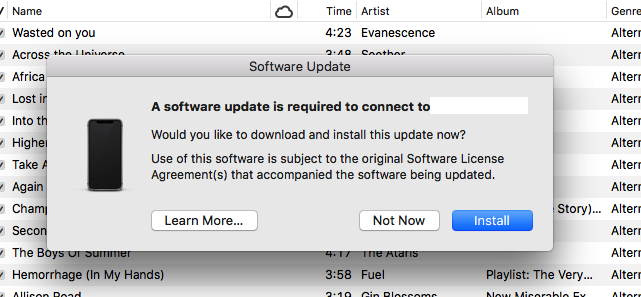
and it worked but now I can’t sync my iphone. If i plug in my iphone using my usb a pop up will appear to install a new software. If i do this will it again ruin my imovie? Or only the new itunes update that makes the conflict with imovie?


i still want to use itunes to sync music and videos so i wonder if i can still make it work without reoccuring the same issue...

11 replies

Sadly, unless I did something wrong, this no longer seems to work with iOS 14. I'm running 14.2, iTunes v12.9.5.5 on Mojave. Replacing the whole MobileDevice.framework file still allows iMovie 10.1.6, but sync to iTunes remains broken as a the compromise. Was hopeful that Nemesis_96's solution would allow me to at least get WiFi sync working again. But alas, no joy. Maybe I did something wrong. I did the same procedure disabling/enabling SIP, all the reboots and what not. I'm able to reverse it, so I tend to think 14 requires Catalina for WiFi sync. Should have stayed at 13.6. I may just bite the bullet and upgrade my MBP to Catalina. Just gotta do an inventory and make sure I won't lose any mission critical hardware or software support.


If you have the capability to upgrade to Catalina then I suggest that you should. If not, hopefully my solution could help you as it did on my end.

What I was thinking is maybe if I still have IOS 13 in my Iphone 11 pro then it will work but I don’t think I can downgrade after I updated it to IOS 14.


Is the itunes software update and the phone software update (pop-up window when you plug it in usb) the same?

Is the itunes software update and the phone software update (pop-up window when you plug it in usb) the same?


I don't know the answer to that question. Perhaps someone on the iPhone iOS forum might know. Here's the link to the forum:


https://discussions.apple.com/community/iphone


-- Rich


I don't know if this is good news but I found a solution to sync my iphone and make my imovie work smoothly like before. I can now sync my iphone via air or "wireless" and update my music, videos, and etc. but once you use a USB cable, itunes won't be able to detect your phone. To me that is fine I rarely update my files using the USB cable anyways. I found out that it is not the entire "MobileDevice.framework" folder that causes the error in imovie. It is the file called "MobileDevice". I compared the old vs new MobileDevice file and it appears that the new one is a smaller file, therefore something has been changed there that causes the error in imovie. Here are the steps that I did to make things work:


  • Go to this thread and read how Nicocaro found the culprit and read after that Donatien290's instruction on how to overwrite the new "MobileDevice.framework" folder with the working old version. https://discussions.apple.com/thread/251266351?page=2
  • Download the old clean version of "MobileDevice.framework" from Donatien290's link in his Youtube video. Search this title on youtube: " erreur partage vidéo FCPX/Imovies ---- video export final cut crash " Go to description and you will find the download link there.
  • Update your Itunes as required. Yes, you have to update your itunes even though we already know that it will affect exporting projects in imovie.

or simply plugin your iphone via USB cable and update with the new software.


  • Open the old "MobileDevice.framework" that you just downloaded from Donatien290's video and copy the "MobileDevice" file.
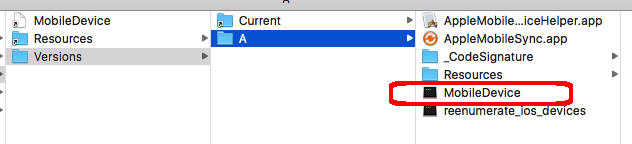

  • Go to finder and open your Macintosh HD and go to this folder address:


/System/Library/PrivateFrameworks/MobileDevice.framework/


  • Open "MobileDevice.framework" folder, and go to verions/A/ and paste the old "MobileDevice" file to overwrite the new one.
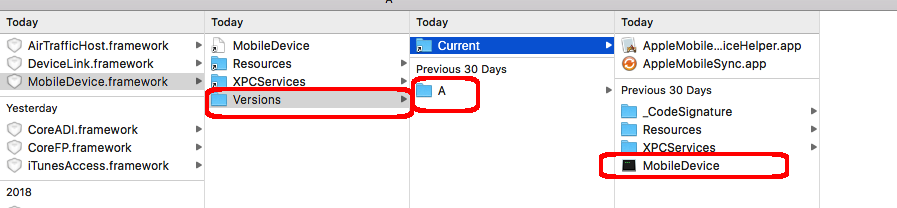


Thats it! My device OS is El Capitan 10.11.6 2011 Macbook Pro, itunes version is 12.8.2.3 (last version released), and imovie 10.1.6. I hope this helps and let me know if this works on your end as well. Who knows maybe Apple will fix the issue in their next update.


Others have mentioned the issue that you are experiencing after replacing the MobileDevice.Framework. I have not seen any further comment on a fix.


-- Rich

Thanks I will try to post there.

Good luck in pursuing this issue. If you find out the answer and have time to do so, please post back with your results, as it might help others with this issue.


-- Rich

Yeah for sure

Thanks. Hopefully this issue is not permanent and Apply will look into it to fix the bug.

Great work, Nemesis_96! Your findings and solution will help others with this problem.


-- Rich